

In the past, video content used to be a luxury. Now, it is the baseline. If you run a business or build a brand, you are in the video business. The problem is that traditional editing hasn’t really caught up with this reality. It is still slow, technical, and you even have to worry about frame rates and codecs. This is the friction point that Vmake AI targets. It isn’t trying to be a better version of Adobe Premiere. It is trying to be a production assistant that handles the tedious parts of the job for you.
The most common starting point for using these tools isn’t usually creation; it’s repair. You often have a video that works, but it’s trapped in the wrong format or covered in old branding. Maybe you downloaded a clip from TikTok, and it has that bouncing logo. To use it on Instagram, you need to clean it up.
A reliable way to remove watermark from video files is essential here. It analyzes the pixels around the logo and fills in the gaps. It turns a “dead” file into a usable asset without forcing you to crop out half the frame.
What is Vmake AI Agent?
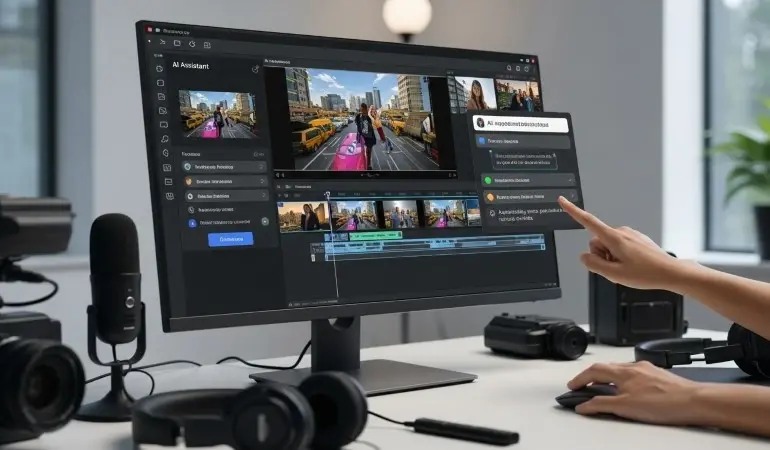
Many other AI Agents are complex and wait for you to click a button. While Vmake introduces a “Video Agent” that works differently. It feels less like using a tool and more like giving instructions to a freelancer. You don’t hunt for the “crop” tool or the “caption” button. Instead, just use a chat window.
You can paste a URL to a product page and tell the Agent to “make a promotional video.” It reads the page. It pulls the product images. It writes a script based on the selling points. This changes the workflow from “how do I do this?” to “what do I want?” It handles the technical translation. You provide the intent; the machine handles the execution.
This is particularly useful for User Generated Content (UGC) styles. The system is able to generate speaking videos of people, using AI avatars to deliver the script. Plus it looks pretty natural.
How To Use Vmake AI Agent For Workflow?
Talking about features is abstract. Seeing how the work actually flows makes it clearer. Here is what a typical session looks like when you move from a raw idea to a finished post.
- Briefing the System: You start in the chat interface. You don’t need raw footage yet. If you are selling a backpack, you drop the link to your store. You type a command: “Create a fast-paced video for TikTok focusing on durability.” The Agent scans the link. It identifies the key features—waterproof material, reinforced zippers, and hidden pockets. It generates a storyboard and a script.
- The Generation Phase: The system builds the video. It selects stock footage or uses the images from your URL. It adds a voiceover. This takes a minute or two. The result is a draft. It might be 80% there. The tool gets the timing right, picks the music, and structures the narrative according to your needs.
- Refining in Canvas: No AI is perfect. You will likely want to change something. This is where you switch to the Canvas editor. It looks more like a standard editor, but simplified. You might swap out an image that doesn’t fit. You might tweak the voiceover speed. This step is about polishing. You take the “good” draft and make it “great.”
- Captions and Optimization: Social video needs text. Most people watch on mute. The Auto Captions feature comes in handy here. You can use it to generate captions for your videos. Moreover, you can also pick the style you want.
- Final Packaging The last step is the thumbnail. A bad thumbnail kills a video before it starts. The AI analyzes your video and generates a few options. It finds the most interesting frame. It adds a hook title like “Best Travel Hack?” You pick the winner and export.
Using Hooks to Improve Viewer Engagement
Getting a video made is only half the battle. Getting people to watch it is the other half. The platform includes specific tools for this, focusing on the “Hook.” This is the first three seconds of the video. It is the make-or-break moment.
The AI Hook tool generates specific opening clips designed to stop the scroll. It uses visual effects and motion to grab attention immediately. It isn’t guessing; it uses data on what actually works in performance marketing. If you are running ads, this is crucial. You can test three different hooks for the same video to see which one drives more views.
Using Auto Captions for the Audience That Watches Videos Without Audio
Transcribing audio manually is painful. It takes forever. You have to type, pause, rewind, type again. Vmake automates this for seven languages. It handles English, Spanish, Portuguese, and others.
This isn’t just about translation. It is about accessibility. If your video doesn’t have text, you are ignoring the commuter on the train who doesn’t have headphones. The tool ensures your message lands even when the volume is zero. It also allows for batch processing. If you have ten videos from a campaign, you don’t have to caption them one by one. You can upload the whole folder and let the system run.
Who Vmake Is Designed For?
This isn’t for filmmakers. If you are editing a documentary, you want manual control. You want to color grade every pixel. This tool is for marketers and for the solo entrepreneur who needs to post three times a day. It is for the e-commerce store owner who needs product videos for fifty items.
It democratizes the “agency” look. In the past, getting a polished video, having captions, and 4K quality required hiring freelancers. But now? It’s simple to use tools like Vmake. Vmake is an efficient video editor to edit videos online, and it is available in multiple video editing features, including video enhancer, watermark remover, auto caption generator, hook generator and more.
Final Thoughts
The biggest change here isn’t any single feature. It is the logic of how people create. The world is moving away from manual assembly and towards a direction where you act less like an editor and more like a producer. You verify the work rather than doing it from scratch.
Vmake represents this shift clearly. It bundles the strategy (script generation), the production (video creation), and the post-production (editing and captioning) into one flow. It removes the friction. It lets you focus on the story you want to tell, rather than the software you need to learn.